Blog

  • Heading to Texas next week for SXSWi

    I get the impression that a very large British contingent is heading to Austin, Texas for SXSW this year, based on the few conversations I’ve seen floating around Twitter. I’ll be amongst the masses, heading to my favourite event of the year.

    sxsw-logoSouth by Southwest Interactive is “Spring Break for Geeks”, with around 7,500 attendees; developers, designers, marketing people, social media folks like me, hippy dippy creatives… All there to learn, exchange ideas and have a lot of fun in the meantime. Not sure it’s much of a break, considering how much there is to do in only a few days.

    I’ll be blogging whenever I can and twittering as usual, so if you’re attending, drop me a line to say hi. Hopefully we’ll have the opportunity to meet face to face at the conference center, or over a drink at one of the many evening events.

    Texas, this time don’t disappoint me, I don’t want any snow. I want 25 degrees Celcius, sunny weather, a light breeze, oh and a cocktail umbrella on my drink too please!

  • Astroturfing & Disclosure: Where Do You Draw the Line?

    As more businesses start peppering their marketing plans with social media projects, activities that previously were reserved for the geeky early adopters are now coming under scrutiny when used for commercial endeavours.

    astroturf-belkinWith all this new media growth, there’s no clear rule book yet. We’re writing it as we go, and just like the Bible, there are an awful lot of different interpretations of the same guidelines.

    Certain aspects of blogging and online brand identity are seeing their limits pushed by certain brands lately…

    Belkin, the computer peripherals manufacturer, was caught red-handed recently when The Daily Background Blog uncovered that a Belkin employee used Amazon’s Mechanical Turk and similar services to solicit paid reviews. An anonymous tip-off from a Belkin staff member seemed to confirm this wasn’t a one-off either.

    Belkin apologised publicly for the actions of its employee, but “Is that enough?” asks The Responsible Marketing Blog.

    The above is a clear case of astroturfing, but rarely is the line quite so clearly drawn into the fake plastic grass.

    Before I go any further, let me pause and let Wikipedia explain the concept of Astroturfing:

    Astroturfing is a word in American English describing formal political, advertising, or public relations campaigns seeking to create the impression of being spontaneous “grassroots” behavior, hence the reference to the artificial grass, AstroTurf.

    Back when I worked for Active Hotels, we prided ourselves in having a hotel review system that was much more fool proof than average; only guests that had stayed at the hotel, paid for their stay & been confirmed by the hotel would be able to leave a review. The site was engineered to discourage astroturfing on the part of overzealous hotel managers – while it didn’t stop them, each attempt would cost them a commission, which in most cases was enough of a deterrent. Trip Advisor couldn’t exactly say the same of their reviews. Ethically, again the line is fairly clear; you haven’t stayed, you shouldn’t make up a review about a hotel. Still with me?

    Via Simon Collister, I then I found a blurry line, one written by the Chartered Institute of Public Relations (who often strike me as not “getting” the online world at all):

    “[CIPR] Members’ use of social media must be transparent, and they must make extra effort to disclose any potential conflicts of interest. … In this regard, members should be aware that ‘ghosting’ a blog is illegal”

    Woah, hold your horses there, Georgie! Surely, their definition of a ghost blog is different to mine then? A ghost blogger, in my experience, writes on behalf of the CEO, politician or other high-profile person, who may have called the PR team from across the country to give an outline of what they wants to say, letting them find the exact words.

    Marketing teams are used to committee-written press releases, so blog entries often get the same treatment. Circulating between the marketing team, the CEO and the legal time a few times in a three-way table tennis match, the watered-down, reviewed entry gets posted. It may not be the most genuine method of writing, but it certainly isn’t something I’d consider illegal.

    I suspect that what they refer to as ghost blogging is in fact the above-described astroturfing, which deserves a long stay on the naughty step and a spank to the bottom (not in a good way!)

    How does this scenario (not the bottom spanking, the ghost writing for the CEO one), and every other one in between, fit in alongside all other transparency issues encountered online?

    It’s not the first time I bring up my issues with non-disclosure & dodgy marketing practices, but as social media becomes a more mainstream interest for marketing bods of all walks of life, I truly hope that we’ll all take a few moments to think about the opportunities available to us. If organisations spent as much on building positive branding and community relations with their audiences as they do on being snake oil salesmen equipped with smoke and mirrors, the relationships could have a far longer shelf life.

  • Which British TV Chef Are You?

    Everyone approaches life and its challenges in a different way, just like chefs approach cooking and pleasing customers in very different ways.

    Are you most like…

    Jamie Oliver
    jamie_oliverHealthy family fun, you want to change the world and have high ideals. It isn’t always about the final result but about the process and the social change involved in what you do. Grannies think you’re cute and blokes envy your success. Everyone else just thinks you own a funky campervan.

    Gordon Ramsay
    Unquestionably skilled, you want the best for the other party but sometimes struggle to get your message through without offending first. You enjoy authority, are opinionated and get your way every time – often by being the loudest in the room. Most of the time people think you’re a tosser, except when they think you’re brilliant.

    Heston Blumenthal
    You’re a bit of a nutter – in a good way of course – and love experimenting and pushing things past their limits. You often opt for the “acquired taste” option, which leaves half the population baffled, and the other half in awe.

    James Martin
    You’re not bad at what you do, but you realise that luck and being born with a silver spoon in your mouth may have helped you fast-track in life. You’re charismatic when you feel like it, but when you can’t be bothered, you throw the toys out of the pram and show your true colours.

    Ainsley Harriott
    You like to have fun in life and it shows. You’re less worried about the quality of what you do, and a whole lot more about catering to as broad an audience as possible. You make up for the quality with humour and altruism.

    Nigella Lawson
    You’re charming, you know it, and you use it to your advantage. Hedonistic pleasures are no strangers to your life and you know how to have a good time, yet remain thoroughly classy.

    Delia Smith
    You once had it, but now you’re not to sure where and how you lost. In fact, you’re probably not really sure of where you are right now. You occasionally make dodgy time and money investments, finding yourself entirely out of your depth. Regardless, everyone thinks you’re kind of sweet.

    Keith Floyd
    You talk absolute rubbish most of the time, but people love seeing you because you’re always a good laugh. As long as life is accompanied by an oversized glass of red wine, you’re satisfied. Somehow your drinking, more than your cooking, has made you a legend.

    Who did I forget? 😉

  • Cute Red Ford Ka 07 Needs a New Home

    My little red Ford Ka

    Yep, you read right. I’m selling my gorgeous little red Ford Ka.

    Wondering why? I’m just upgrading to something slightly bigger (a 5-door Fiesta) and rather than part-exchange it, I want to first try to find a new home for it. It’s still in absolutely pristine condition inside and out as I’ve taken great care of it so here’s the spec:

    • Ford Ka 1.3 Petrol, Zetec Climate model (with all the extras!)
    • April 07 registration so it’s not even 2 years old yet
    • 14,200 miles on the clock (driven by me, so it’s always been gently driven)
    • Bright Colorado red paint, unblemished paintwork – professionally detailed
    • Air conditioning
    • Heated front windscreen (brilliant when it’s frosty in the morning)
    • Electric windows
    • CD Player
    • Alloy wheels
    • Roof spoiler
    • over 1 year to go before it’s due its first MOT

    As it’s under 2 years old, it still has over a year’s manufacturer warranty, which means that in the unlikely event of a crash, the exits can be located here, here and here any problems, they will be fixed for free by any Ford dealer.

    It’s such a cheap car to insure, and it’s been absolutely faultless so I have no doubt it’ll be a great car for whoever buys it. Now, what you wanted to know… How much? Well, looking at the other Ka’s advertised, this one is better spec and newer than pretty much any on sale. However, I won’t price it any higher than the others, so I’m looking for £4990 for it.

    I’m based near Cambridge so I hope to find a buyer who’s able to come pick it up from mine. Ideally, I’d be looking to hand it over at the end of March, since that’s when my Fiesta should arrive, but we can work something out if you need it sooner.

    Drop me a line on vero@thatcanadiangirl.co.uk or give me a call on 07875 540 945 if you’re interested.

  • Five tips to maintain your aluminium MacBook Pro

    Getting a new Mac is a great experience; Apple have worked for many years to make the unboxing experience memorable and special. People talk about it, document it in photos or in video. But what happens when you’ve had it for a few weeks, months or years? It gets scratched, damaged or dirty. That “yummy new shiny machine” feeling disappears.

    So why bother caring for your aluminium MacBook Pro? If you want to sell it after a year or two to upgrade to a newer model, having a clean and scratch-free laptop allows you to sell it for a bit more (money you can then put towards your new model!) Meanwhile, if you choose to keep it, you can show up to a meeting with a beautiful and fresh-looking computer.

    These top tips to keep your Mac from showing age are guaranteed to work an awful lot better than anti-ageing creams!

    1. Protect the case

    macbookpro_with_stickersWhichever way you do it, protecting your metal case from scuffs and damage is a great way to keep it from looking rough in the future.

    I originally covered mine in stickers to differentiate it from all the other MacBook Pros in the office, using stickers I was given from Digg, Lolcode, Soma FM, Laughing Squid and many more.

    Do the same to show some personality or, if you want to be more graceful, you can use one of the many amazing skins now available online:

    Alternatively, at least be sensible enough to use a laptop sleeve like the Black LaRobe sleeve to keep it protected when you’re carrying it around.

    2. Fix your mistakes

    Put tons of stickers on your aluminium MacBook Pro case and changed your mind about them?

    In my case, I had to hand the laptop back at work. Everyone sniggered it would look like hell after I destickered it. But fear not, you can very easily remove stickers from the aluminium laptop case with a small dose of WD-40 and a bit of patience.

    First, peel off the vinyl stickers that come off in a single piece; they’re the ones that feel rubbery and shiny. Then peel off what you can of the top layer of the paper stickers. These will leave a white paper layer or at least some sticky glue on the laptop. That’s when you get the WD-40 out; close the laptop lid first, spray WD-40 lightly on a white kitchen roll. Rub it in gently onto the paper or sticker glue area and let it “soak” slightly. Once the WD-40 works its magic, it should be very easy to rub off the sticker glue off. Buff the laptop cover gently with a soft cloth when you’re done to bring it back to its original shine!

    [If you’re worried that you might do damage, start with a small area of the laptop on the underside of it to check that it won’t stain or discolour it. This tip worked wonders for me, but comes with no guarantee. If you’ve done weird stuff to your laptop beforehand, don’t hold me responsible!]

    3. Take care of your screen

    Aside from the obvious care tips like not stabbing your screen with pens and dirty fingers, the best way to keep your screen, glossy or matte, in good condition is to give it a light clean every so often.

    As much as possible, I try to use the cloth that came with my latest pair of glasses and warm breath, but to remove oily marks, the best product (and afaik only one endorsed by Apple) is the iKlear screen cleaning spray.

    Follow the instructions and be gentle. You need to stare at that screen for days on end, so best take care of it!

    4. Don’t squeeze me too tight

    I’ve recently noticed a rising number of people who treat their laptops like they’re made out of steel armour plating. It’s still a fairly fragile construction, even the fancy latest unibody machines, so throwing it into a backpack or piling books on top of it can quite easily damage the screen!

    5. Get AppleCare

    This one is a question of personal preference, but ever since I’ve started buying Macs for myself, I’ve insisted on having AppleCare – Apple’s own protection plan, which covers you for much of the likely problems

    It doesn’t replace being careful (eg. dropping your laptop or spilling beer into it won’t get it replaced) but will cover you for most hardware issues. As far as I’m concerned, if your computer ever leaves your desk, it’s worth having insurance on it.

    Just be smart!

    If you want to have a throw-into-a-bag-and-go laptop, get an ASUS Eee PC or similar netbook, Hackintosh it if you must. Or use the tips above to keep your aluminium MacBook Pro in the best condition possible to resell later!

  • Twestival: Charity, Water and Music

    Tonight, in over 170 cities across the world, people are getting together for an evening of fun and to raise money for charity:water. After a first successful event in London back in September 2008, brave organiser and fellow Canadian gal Amanda Rose decided to take on the world. Rather than a single event in a single city, over 170 Twestivals have cropped up in cities worldwide, from Vienna to Sydney and Doha to Rio de Janeiro, like mushrooms after the rain!

    twestival-logoBut who are all these volunteer organisers and attendees?! They’re all active Twitter users.

    We’re talking about hundreds of self-organised volunteers who found a venue, sourced musicians, announced and promoted the event. Having organised the first SocialMediaCamp London, with a second one in the works, I’m amazed at the communal effort put towards this event which is expected to raise over $1 million USD for charity:water.

    One of the aspects I love most is the contributions from artists; Over 160 tracks donated by artists have been uploaded to Twestival.fm for people to download under a ‘pay what you want’ scheme reminiscent of Radiohead’s In Rainbows album.

    British singer-songwriter Imogen Heap (who I could listen to for days on end!) chose to donate an unfinished song, “The Song That Never Was”, for artists to remix and edit in their own way. It’s taking Creative Commons to a new level, and I simply can’t wait to see what creative minds make of it.

    Once considered to be a bizarre service used only by geeks, Twitter is now not only a mainstream tool, but it’s a communication tool that is underpinning powerful social events. Might it be worth considering signing up for it now?

  • Arriving Smarter: More Than 15 Ways to Get Busy During Dead Time

    london_underground
    Most of us spend at least an hour a day travelling; commuting to work by car, train, bus or flying somewhere for business. It’s time that’s often spent looking out of the window, texting mates or eyeing the cute guy/girl sitting across from you on the train. (Or if you’re travelling to London, wondering whether the leaves on the track are going to delay the train again…)

    It’s an hour or more that you should recuperate and use for your own benefits so here are a few suggestions for arriving smarter. [Credit to Christopher S. Penn for the “Arrive Smarter” theme & Tarek for pointing me to it originally.]

    Listen to an audio or video podcast

    Podcasts vary in quality, style, length and topics, so whatever you want to listen to, you should be able to find it. I tend to opt for a more focused podcast on the journey in; it wakes up the brain, gives some interesting ideas and motivation for the day. On the way home, I prefer the freestyle and slightly silly podcasts, which are sometimes informative, but always lighthearted.

    • TEDTalks video podcasts: TED offers some great food for thoughts from some fascinating people all over the world. Pick a topic you feel has little to do with your day job or industry and just listen. Some notable speakers for me have been Jill Bolte Taylor, Ze Frank and a number of people who spoke about creativity, imagination & education. [TEDTalks iTunes link]
    • BBC Radio 4 World of Business podcast
    • Heidi Miller’s Diary of a Shameless Self-Promoter: Brits tend to be much too self-deprecating and rubbish at self-promotion, so this one’s for you, my lovely limeys! Heidi’s podcasts cover a range of topics relating to promoting your business, yourself, and smart networking. [DSSP iTunes link]
    • Look for audio readings of Cory Doctorow‘s books, it’s always good to listen to.
    • Poke around the Podcasts section in the iTunes store and let me know what discoveries you make!

    Tip: If you’re an iPhone/iPod user, set it to automatically sync a few “most recent unplayed” podcasts through the options in the “Podcasts” tab in iTunes. That way, you’ll always have fresh stuff to listen to even if you haven’t had the time to pick podcasts manually before travelling.

    Pick a book that will help you towards your goals this year

    If you’ve picked a themeword for 2009, to help you drive your year forward, browse the web for a list of a few books, ebooks or research papers that will get you closer to your objectives. Or just pick a book to make you think, laugh or cry!

    Here are some of mine, to accompany my themeword “Impact” for 2009.

    • Tara Hunt‘s The Whuffie Factor, which will be published soon is on my must-read list
    • Cory Doctorow’s Down & Out in the Magic Kingdom is half holiday fiction, half social critique. I’ve already read it but definitely recommend it.
    • Dan Ariely’s Predictably Irrational is proving to be a good read on why and how we take certain actions, and how we may think we’re rational, we’re in fact predictably working on emotions or subconscious cues.
    • If you’re a productivity buff, you’ll know this guy, but if you’re new to it, you might enjoy Tim Ferriss’ 4-Hour Work Week. Or Leo Babauta’s The Power of Less (which will be available soon in the UK)
    • Sitting on my bookshelf for far too long is Charlene Li’s Groundswell is much overdue to be read.

    Keep offline reading material handy on your computer

    If you’re the type who uses a laptop on the commute in, you may not always have the luxury of an Internet connection so when you find interesting PDF ebooks, stick them in a “To read” folder on your desktop to dig into when you’ve next got some spare time.

    Alternatively, if you’re into that dead tree printing stuff,  carry a hard copy if you really must, but use the reverse side of paper you used before, or recycle the paper later by either giving it to someone else you feel would benefit or by chucking it in the recycling bin.

    A few great ebooks:

    • Leo Babauta from Zen Habits (same guy as above) recently published an ebook called Thriving on Less, which is rather appropriate in this year where much of our usual habits need to be re-examined to avoid excessive spending and keep us afloat through tough times.
    • 37 Signals’ Getting Real: While I don’t really go for the 37S Koolaid, I must admit it contains some great tips for working with small teams and producing quality apps.
    • Seth Godin’s Flipping the Funnel may be nearly 3 years old but it remains very relevant. Seth has created a number of ebooks over the years, so why not browse his site and download a few?
    • Chris Brogan wrote Using the Social Web to Find Work is highly relevant in this era of job uncertainty. A worthwhile read.
    • Finally, not so much an eBook but rather a Slideshare presentation you can download: Chrystie Corns, Social Marketing Manager at Where.com created a cracking presentation giving insight into what it’s like to tweet, blog and use social networks for a living.

    Make a conscious effort to relax

    Not interested in any of the above and prefer to snooze or stare out the window on your way into work? That’s fine, in fact, it’s great! Your brain needs that restful time. But let’s do a deal, if you’re going to go for zen, do it well.

    In other words, don’t let the train’s delay, the elbow in the ribs, the loud guy on his phone or the snow wrecking havoc piss you off. Take a deep breath and admire the glint of the sun on the buildings. Smile at strangers. Just enjoy the mental time off.

    [Image: Birdbath’s Piccadilly Filly (or 50 Things you never knew about London Underground) on Flickr, Creative Commons license]

  • RSS Feeds: Full Fat or Summaries?

    I love RSS and I hate RSS.

    It’s both one of the most useful tools I’ve ever used; it allows me to catch up with my favourite blogs, keep up with seldom-blogging friends and find inspiration for my own posts.

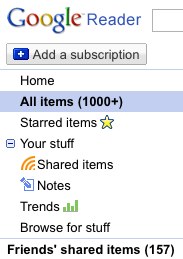
    google_reader-1It’s also the bane of my life; I turn away for a day or two and Google Reader sits there, laughing at me with its smug “1000+” in the toolbar, reminding me just how far behind I’ve fallen on my reading.

    Either way, it’s a way of consuming media that seems to have become routine so this morning, when I came to the realisation that I had just unsubscribed from my last summary-only RSS feed, I wondered if I was the only one to take such drastic action against those frustrating feeds, and wanted to understand why anyone would choose to publish them.

    I wrote about this topic 2 years ago with little conclusion so I thought I’d investigate informally whether things have changed by asking my Twitter followers.

    So what are their issues with the short summaries?

    The results were enlightening but roughly reflected what I expected; Out of 15 responses, 12 people expressed a strong preference for full feeds, to the extent where summary feeds were either not subscribed to or unsubscribed from.

    • Don’t want to click
    • Don’t want to be forced through to a site to read something
    • Full feeds get more readers and engagement
    • When using Google Reader on iPhone, RSS summaries are annoying. Clicking through is a waste of time
    • I never subscribe to anyone with summary-only feeds, why encourage them?
    • “Publications” opt for summaries to drive traffic and ad revenue
    • Summary on mobile sucks, don’t subscribe and probably forget to visit again
    • Would rather see a full feed with ads, than a summary feed

    One person seemed to stand up for the summary feed, saying that short post feeds are fine when reading basic news story while travelling. So that’s one for the summary feeds, but with the caveat that the summary must really summarise the story rather than simply be the first run-on sentence of a post where the author might not get to the point immediately.

    The publishers’ point of view

    Two publishers were kind enough to explain their side of the story; in both cases, it was a question of protecting their content against sploggers who previously stole their feeds on a regular basis. While summaries don’t fully solve the problem, it makes it more difficult for a spammer to copy their content.

    No one piped up with regards to summary feeds as a method to gain more traffic to the site, and more ad impressions as a result. Either that isn’t the motivation of most summary-feed publishers, or they’re aware that it isn’t a popular view and avoided responding to my question.

    Finding a solution

    Finding a solution to these publishers’ problem is tricky; it’s difficult to identify who is subscribed to your RSS feed and what they’re using it for. Feedburner makes a good effort of reporting “uncommon uses” of your feed, but in my experience it has picked up the legitimate uses of my feed (where I’ve used it on another site I own) but missed most instances of splogs “borrowing” my content.

    So if the flow can’t be stemmed, we need to make the flow smarter:

    • Add an automatic footer to a post in the RSS feed linking back to your site: Joost de Valk created a WordPress RSS footer plugin which takes care of the hard work for you.
    • Cross-link generously when writing your posts: Don’t go overboard and write purely for the purpose of linking back to your older content, as it’ll show in the quality of your posts. But when you do post, think of the relevant and useful content you could refer to, so that if your post is on someone else’s blog, there is still a reference to yours. This can be done within the content or as “related items” at the end of your post. Yes, some services or plugins can create related items automatically, but I don’t endorse those as I find the relevance to often be too poor. Take 5 minutes and do it manually!

    These benefit you from an SEO point of view as well, so why not put them into action? Remember, however, that creating value on your site and building your personal brand so that people recognise you as YOU rather than a generic blog-post churner is the best way to create a loyal readership and make the sploggers’ efforts (almost) pointless.

  • SocialMediaCamp London 09: Rallying the troops!

    smc_small

    Earlier this week, I announced that the planning for the second SocialMediaCamp London was beginning to take shape.

    In October 2008, 100 geeks, creatives and social media’ites gathered for the first SMCLondon, which was both a success and a hell of a lot of fun. So we’re doing it again in April, and we need you!

    Find out more about what’s happening on the SocialMediaCamp blog, but if you want to get involved, here are some of the responsibilities to be assigned; Sponsor wrangler, Backchannel boss, Venue scout, T-Shirts & Stickers master, Food czar, Badges & signs design artist, Evening drinks & Saturday night happenings rockstar, Video streaming guru, Event cheerleader & promoter, etc…

    If you want to help out, email me on vero@thatcanadiangirl.co.uk with a note on what you’d like to do, and remember that all help, whether beforehand or on the day, is welcome! I’ll be posting the sponsorship information soon, so if you think your boss (or you, if you’re the boss!) want to contribute a bit, get in touch and I’ll send you the sponsorship pack.

    Last time, tickets went like hotcakes and all hundred were gone in under 3 hours, so if you want to attend, be sure to sign up to the newsletter (in the left sidebar) so you can be first to find out when the tickets will be released!

  • 10 Ways to Improve Your Home Office Productivity

    Ask anyone who is self-employed or regularly works from a home office, and you’ll get polarised answers; The home office is either the best or the worst thing that’s happened to them. Either a source of peace and focus, or a never ending stream of distractions and frustration.

    beach_officeIn my case, I have to say, it’s been bliss. I’m a social being so I’m thrilled that I get the opportunity to work face to face with clients and colleagues fairly regularly, but I relish the few days a week where I can go a whole day without distractions. The productivity I get out of those days is amazing, so I thought I’d share how I took my space from being “the back room with a desk in it” to “My office” from which I can run a business.

    1. Keep your goals visual and within sight

    I recently wrote about having clear goals for your day, as a way to drive your productivity. Set your 3 most important tasks for the day and stick to them. It doesn’t mean you can’t do anything else, but each unscheduled task that comes in needs to be critically assessed. “Will this stop me from getting my 3 MITs done today? Is it worth sidetracking for right now?”

    Stick them on the wall in an obvious place so that you don’t forget to refer to it.

    2. Get a timer

    Whether it’s a virtual one (I use Alarm Clock 2 for Mac) or a physical one, like a kitchen timer or a radio alarm clock, it’s a great way to motivate yourself when facing tasks you hate.

    Set the alarm for a block of time (I tend to go for 20-30mins depending on how distracted I fear I might be) and cram as much as you can during that time. I’ll use it to get the draft of an article complete, then when the timer goes, I’ll take a break and get on with editing the ideas and polishing the article. This can make bad days seem a whole lot better after a few productive blocks!

    If you belong to the other extreme, and can find yourself still working in the same position hours after you started, you may want to use it to remind you to take breaks. A friend of mine uses Time Out, which pops up a reminder to look away from the screen every 10 minutes and one to take a break every 50 minutes. Stand up, move around, have a sip of water… Simple but these small steps can help you avoid the discomforts of RSI at a later date.

    3. Buy an inbox tray

    Everyone says this, but not enough people do it. A pile of paperwork on the corner of your desk is not the way to go; it’ll distract and stress you every time you see a mountain of things you haven’t dealt with yet.

    Mine is a silver mesh 3-level inbox tray, with the top one labelled “Inbox”, the second “Accounts” and the third “Scrap Paper”.

    The top one takes in all business-related (and personal, let’s admit it) paperwork which gets filed into a filing cabinet behind me or sorted into projects to action twice a week. The second one contains any receipts, bills or accountant-related material that needs more attention than simply going in the Inbox. The bottom basket contains scrap paper, old print outs where the back of the page can be used for notes, etc. It’s easily within reach so that when the phone rings or inspiration catches, I don’t need to spend time looking for a scrap of paper to write on.

    4. Get a whiteboard (or two)

    If you have any wall space available, I’d recommend a whiteboard. It’s a great way to sketch out an idea or leave yourself big obvious reminders of progress. I tend to put high-level targets/goals for the month on the board and tick them off to get a sense of progress throughout the month.

    For example…

    January Projects

    – Client A: Complete Phase 1 of project
    – Client B: Provide 3 days of support for Phase 2
    – Write n posts from topics list
    – Close £n in new business
    – Book attendance to Event

    Every time I complete an action that wraps up the project, it feels great to tick it on the board.

    For those who get inspired in the shower, I’ve seen great bathtime whiteboards for kids before, so stick one in the shower and scribble that superb idea before it disappears.

    5. Shape your energy with scents and sounds

    Every so often, treat your senses to revive your energy. You may be surprised of the effect it has on your mood.

    Need to focus and energise? Put lemon & orange or satsuma & spice scented oils in your oil burner.

    Stress of the day getting to you? Put some lavender in, close your eyes, take 10 deep breaths. Pause for a moment and get back to work.

    Want to pretend it’s Christmas? My favourite mix is: 4 drops of satsuma & orange and cranberry oils each and 2 drops of vanilla extract and cinammon each. Yum!

    In my personal opinion, I would avoid the use of incense. It can get smoky and the smell of old incense lingers for a long time which can trigger headaches if you’re prone to them.

    Music can also have an impact on your energy levels; create playlists to energise, relax and focus. Personally, I opt for classical piano for focus, Soma FM’s Groove Salad for general writing and pop music when I need to motivate myself to get filing and clearing up done!

    If you can, get some headphones. Sometimes tuning the world out (whether it’s the kids or the construction outside) is the only way to get full focus onto the task at hand. I live in a quiet neighbourhood and am childfree so open cup wireless headphones are ideal; I can still hear the doorbell ring if I’m expecting a delivery. You may want some radical noise-cancelling headphones if you’re surrounded by more noise.

    6. Give yourself breathing space

    Your home office should be your haven of productivity, not a messy backroom where you sit on the edge of the bed to write (unless that’s really how you get into creative mode!)

    Think wisely when buying new furniture or storage for the office: Will it improve your productivity or just be something cute that sits on a shelf and adds to the clutter? I received a humongous red bean bag from Sumo Lounge a few months ago, and kept it in the office for a while. Don’t get me wrong, I love it, but last week, I relocated it and am much happier to have regained the walking space in the office.

    7. Keep creative tools nearby

    If your job requires creativity, sometimes a bit of madness can kickstart the process.

    Creativity cue cards: I’ve pasted them to index cards and added to the pack with some ideas of my own. I’ll just grab something randomly from the pack and start sketching until I find a thread I can run with.

    Whiteboard: Draw a process chart, brainstorm keywords or draw pictures, whatever helps you find an angle to approach the issue

    Lego, silly putty and arts & crafts materials: Yup, I’m a grownup (well, that’s debatable…) and I own a big box of Lego bricks. Sometimes letting your subconscious work while you distract yourself can be just the trigger you need.

    8. Keep emergency snacks nearby

    If you’re focused, don’t let the urge to make a sandwich distract you. Keep dried fruits, nuts and water at hand. However, remember to take midday breaks to feed yourself properly!

    Shop smartly so that you have a good balance of healthy snacks and nutritious meals to avoid having to break up your day to go to the supermarket.

    9. Declutter

    Create a folder for each project to make tidying easy at the end of the day. Put each project away and make a list for the following morning instead of leaving every file out as a reminder. It’ll make tomorrow morning feel a lot less daunting when you walk in.

    At the end of the week or when you have dead time (eg. when you’re on hold with customer service, waiting for a conference call to start…) pick a single shelf and remove anything that’s accumulated. Put the receipts into your expenses file, put the Christmas cards you received 2 months ago from a client in the recycling bin (they don’t need to know!) and you’ll feel it’s much easier to keep your office clutter-free.

    10. Accept that some days won’t work your way

    I’m still no good with unexpected derailing of my day, but sometimes, there will be unavoidable distractions; building works, deliveries, errands that must be run or, for parents, kids who are sick and staying home for the day. On those days, accept that you may need to switch your focus to the jobs that can be done quickly and between distractions as opposed to writing your most in-depth research paper.

    What are your tips for a more productive and zen-like home office?

    Other resources: